You can register an additional 200 custom paper types besides the default paper types registered in the machine.
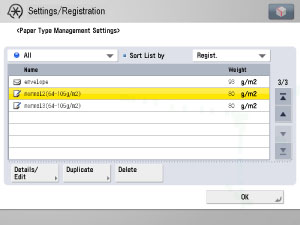
The icons displayed on the screen are:
 : Paper that is registered from [Duplicate] with default settings.
 : Paper that is registered from [Duplicate] with changed settings.
You can select a paper type to display from the paper type selection drop-down list.
[All]: Displays all paper types.
[Standard Type]: Displays only standard paper types.
[Custom Type]: Displays only custom paper types.
|
NOTE
|
|
Only user-registered paper types can be edited.
You cannot change the detailed information of paper being used for copying/printing jobs.
You can sort the paper type list by registration date ([Registered]), name ([Name]), or basis weight ([Weight]) from the Sort List by drop-down list.
|