You can register, confirm, and delete delivery destinations.
|
NOTE
|
|
The maximum number of destinations you can register is 100.
|
1.
Press  → [Management Settings] → [Device Management] → [Device Information Delivery Settings] → [Register Destinations] under <Transmitting Settings>.
→ [Management Settings] → [Device Management] → [Device Information Delivery Settings] → [Register Destinations] under <Transmitting Settings>.2.
Register a destination.
Press [Reg.].
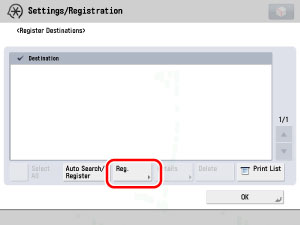
Enter the IP address of the destination or FQDN (Fully Qualified Domain Name) (i.e., starfish.organization.company.com) → press [OK].
|
NOTE
|
|
For instructions on entering characters, see "Entering Characters from the Touch Panel Display."
If any of the following is true for the destination machine, a message <Could not obtain device information details. Do you want to register it as a destination?> is displayed. If you press [Yes], <Deliverable Settings> on the Details screen will be blank.
The main power is turned OFF
The destination machine is not connected to the network
A default key is not set
Every function in Restrict Receiving for Each Function under <Receiving Settings> in Device Information Delivery Settings is set to 'On'
[Use HTTP] is set to 'Off' in Preferences (Settings/Registration)
|
Press [Auto Search/Register].
Press [Start Auto Search].
To display the search results as host names, press [Display Host Name].
Press [-] or [+] to set the search depth (how many routers to search).
|
NOTE
|
|
Since searching uses SLP (Service Location Protocol), machines behind a router will not be detected if the router is set to restrict passing with the SLP protocol.
If any of the following is true for the destination machine, you cannot search the destination.
The main power is turned OFF
The destination machine is not connected to the network
A default key is not set
Every function in Restrict Receiving for Each Function under <Receiving Settings> in Device Information Delivery Settings is set to 'On'
[Use HTTP] is set to 'Off' in Preferences (Settings/Registration)
|
Select the destination → press [OK].
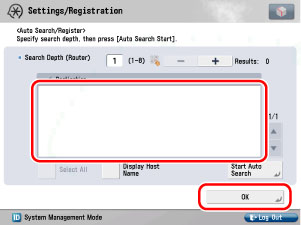
To select all of the destinations, press [Select All]. However, if a destination is selected, this key changes to [Clear Selection].
|
NOTE
|
|
You can cancel a selection by selecting the destination again.
To cancel all destinations, press [Clear Selection]. ([Clear Selection] changes to [Select All].)
|
1.
Press → [Management Settings] → [Device Management] → [Device Information Delivery Settings] → [Register Destinations] under <Transmitting Settings>.
→ [Management Settings] → [Device Management] → [Device Information Delivery Settings] → [Register Destinations] under <Transmitting Settings>.2.
Select the destination whose settings you want to confirm → press [Details].
3.
Confirm the settings → press [OK].
If you have changed the destination machine's settings in Restrict Receiving for Each Function under <Receiving Settings> in Device Information Delivery Settings, press [Obtain Information] to update the destination machine's information.
|
NOTE
|
|
If any of the following is true for the destination machine whose settings you want to confirm,
<Deliverable Settings> on the Details screen will be blank. The main power is turned OFF
The destination machine is not connected to the network
A default key is not set
Every function in Restrict Receiving for Each Function under <Receiving Settings> in Device
Information Delivery Settings is set to 'On' [Use HTTP] is set to 'Off' in Preferences (Settings/Registration)
|
1.
Press → [Management Settings] → [Device Management] → [Device Information Delivery Settings] → [Register Destinations] under <Transmitting Settings>.
→ [Management Settings] → [Device Management] → [Device Information Delivery Settings] → [Register Destinations] under <Transmitting Settings>.2.
Select the destination that you want to delete → press [Delete].
To select all destinations, press [Select All]. However, if a destination is selected, this key changes to [Clear Selection].
|
NOTE
|
|
You can cancel a selection by selecting the destination again.
To cancel all destinations, press [Clear Selection]. ([Clear Selection] changes to [Select All].)
|
3.
Press [Yes].
|
NOTE
|
|
For details on the device information delivery destination list, see Getting Started.
|
1.
Press → [Management Settings] → [Device Management] → [Device Information Delivery Settings] → [Register Destinations] under <Transmitting Settings>.
→ [Management Settings] → [Device Management] → [Device Information Delivery Settings] → [Register Destinations] under <Transmitting Settings>.2.
Press [Print List].
|
NOTE
|
|
The lists can be printed only if A3, A4, or A4R (plain, recycled, thin, or colour paper) is loaded in a paper source whose settings in [Other] in [Paper Drawer Auto Selection On/Off] in Function Settings (from the Settings/Registration screen) are set to 'On'. However, if [Consider Paper Type] for [Copy] is set to 'On' in [Paper Drawer Auto Selection On/Off], you cannot print from a paper source with colour paper specified. (See "Setting the Paper Drawer Auto Selection On/Off.")
|
3.
Press [Yes].