

0WR8-09X
 |
|
To perform personal authentication management, you must first register user information in the database of the machine.
|
1
Start the Remote UI. Starting the Remote UI
2
Click [Settings/Registration] on the portal page. Remote UI Screen
3
Click [User Management]  [Authentication Management].
[Authentication Management].4
Click [Add User].
NOTE:
To edit user information
Click [Edit] for the user information that you want to edit, make the necessary changes, and click [Update].
To delete user information
Select the check box for the user information that you want to delete, and click [Delete] [OK].
[OK].5
Enter the necessary information.
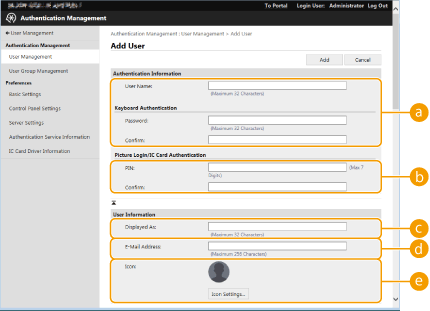
 [User Name] / [Password] / [Confirm]
Enter the user name and password. For confirmation, enter the password again in [Confirm]. Single-byte or double-byte characters can be used for the user name.*
 [PIN:] / [Confirm:]
If users are required to enter a PIN when using Picture Login or IC card authentication, enter the PIN here. For confirmation, enter the PIN again in [Confirm].
 [Displayed As:]
Enter the name of the user. When sending e-mail, the recipient will see the display name as the sender's name.
 [E-Mail Address]
Enter the e-mail address that the user is using on devices such as computers. When sending scanned documents, this address will be displayed along with the sender's name. This address is also used when sending documents by using <Send to Myself>.
 [Icon]
Specify the icon image that the user selects when logging in via Picture Login. Use an image that will be easy to find when displayed in a list.
* Spaces, symbols (\ / : * ? | < > [ ] ; , = + @ " &), and control characters cannot be used.
NOTE:
It is also possible for general users to change their password, PIN, and icon image.
6
Specify other required settings.
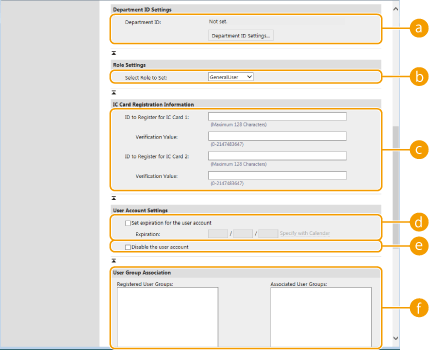 [Department ID]
When using Department ID Management, you must click [Department ID Settings...] and select the Department ID to assign to the user. First, register the necessary Department IDs in [Register New Department] on the list screen. If the Department ID that you specify here is later deleted, make sure to change this setting. Configuring the Department ID Management Settings
[Select Role to Set]The user privileges (roles) listed below can be selected. The available setting items vary depending on the privileges (Settings/Registration). In addition, you can create your own roles. Using ACCESS MANAGEMENT SYSTEM
|
[Administrator]
|
Allows access to all machine operations.
|
|
[GeneralUser]
|
Allows general user privileges.
|
|
[DeviceAdmin]
|
Allows operations that are available to general users, along with the ability to change settings related to basic functions such as copying, printing, sending, and receiving.
|
|
[NetworkAdmin]
|
Allows operations that are available to general users, along with the ability to change network-related settings.
|
[ID to Register for IC Card 1] / [ID to Register for IC Card 2] / [Verification Value]When using IC card authentication, specify the card ID and validity value (number of reissues).
[Set expiration for the user account]When setting a period of validity for the account, select the check box and enter a value for [Expiration].
[Disable the user account]Select the check box to temporarily disable the account.
 [User Group Association]
When you want to assign the user to a group, select a registered user group from the list and click [Add]. This setting is not displayed when using Department IDs as user groups. Configuring the User Login Methods and Authentication Devices
7
Click [Add].
|
NOTE
|
|
Configuring settings via the control panel
You can also register user information by pressing
 <Management Settings> <User Management> <Authentication Management> <Register/Edit Authentication User>. <Authentication Management> <Management Settings> <User Management> <Authentication Management> <Register/Edit Authentication User>. <Authentication Management>Creating user groups
Address Lists in the Address Book can be shared between users who are registered in a user group (Registering Destinations via the Remote UI). To create a user group, click [User Group Management]
[Add Group (Local Device Users)] or [Add Group (Other Users)] and perform the necessary operations on the screen that is displayed. |
|
TIPS
|
|
Save time by importing user information from another machine
If you click [Export] or [Import] in step 4, you can save (export) user information from the machine to a computer, or load (import) user information from another machine. This convenient procedure enables you to register user information just one time.
Check for unregistered Department IDs
If you click [Check Unregistered Department ID] on the screen displayed in step 4, you can find out Department IDs that are not registered in the machine by checking Department IDs assigned to the users against Department IDs registered in the machine.
|
