You can login to SMS using the user name and password used to login to the machine. You can also set so that users cannot login to SMS using the shared password for SMS.
|
NOTE
|
|
The available settings may differ, depending on the status when you logged in.
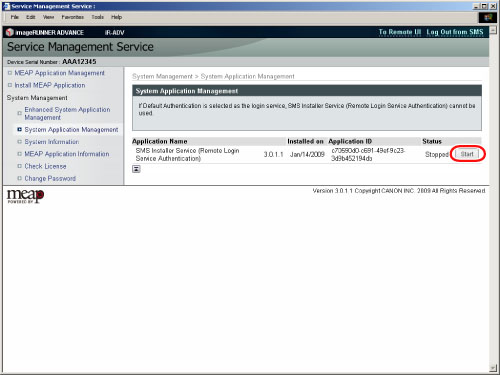
If you logged in using the password for SMS: You can start/stop the user name and password login service (Remote Login Service Authentication).
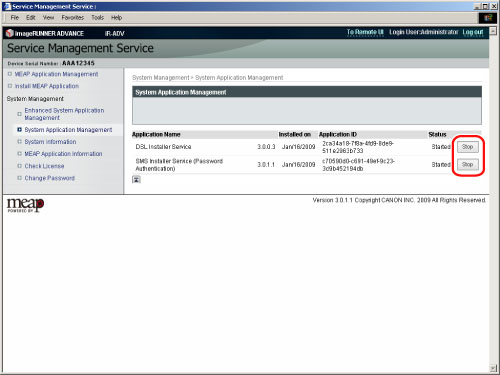
If you logged in using the user name and password for the machine: You can start/stop the login service (Password Authentication) for SMS password.
|
1.
Click [System Application Management].
2.
Click [Start] or [Stop] for the application that you want to start/stop the service.
|
Application Name:
|
The name of the application is displayed.
|
|
Date Installed:
|
The date that the application was installed is displayed.
|
|
Application ID:
|
The unique application ID is displayed.
|
|
Status:
|
The status of the application is displayed.
Start: Stop button is displayed.
Stop: Start button is displayed.
|
The log in method for SMS is set.
|
NOTE
|
|
You can [Start] both the Password Authentication and Remote Login Service Authentication but cannot [Stop] both. (At least one is set to [Start].)
|