You can register/edit up to 200 paper types in addition to the paper types registered by default.
|
IMPORTANT
|
|
Only custom paper types set by the current user can be edited and erased.
|
You can easily register a new paper type by duplicating an already registered paper type with similar properties, and giving it a new name.
1.
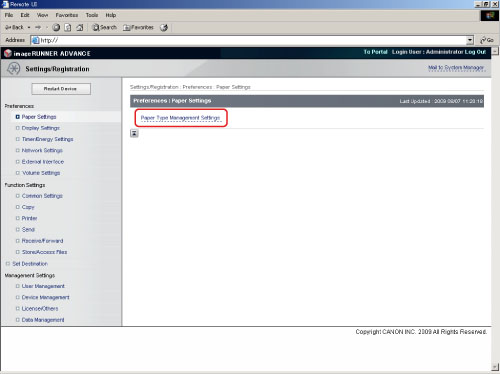
Click [Settings/Registration] → [Paper Settings] from the menu that appears under Preferences → [Paper Type Management Settings].
2.
Select the paper type that has the properties closest to the paper type that you want to register → click [Duplicate].
|
NOTE
|
|
You can use the drop-down list to sort the list according to where the paper types are registered or how much the paper types weigh.
You can click the name of a paper type to display detailed information for that paper type.
|
3.
Enter a name for the paper type → click [OK].
|
IMPORTANT
|
|
The paper type name cannot be registered in the following cases:
If the name is the same as the duplicated paper type.
If the name is left blank.
|
4.
Click the name of the paper type that you registered in the list.
5.
Click [Edit].
6.
Specify the desired settings → click [OK].
1.
Click [Settings/Registration] → [Paper Settings] from the menu that appears under Preferences → [Paper Type Management Settings].
2.
Follow the procedure in steps 4 to 6 of "Registering Custom Paper Types (Duplication)" to edit the custom paper type settings.
1.
Click [Settings/Registration] → [Paper Settings] from the menu that appears under Preferences → [Paper Type Management Settings].
2.
Select the paper type you want to erase → click [Erase].
3.
Click [OK].