

0WR8-02E
If you always load the same size and type of paper in the multi-purpose tray, register it as <Favorite Paper> in advance. <Favorite Paper> can be called up from the screen which is displayed when loading paper.
1
Press  .
.
.2
Press <Preferences>  <Paper Settings> <Register Favorite Paper (Multi-Purpose Tray)>.
<Paper Settings> <Register Favorite Paper (Multi-Purpose Tray)>.3
Select a button to register and press <Register/Edit>.
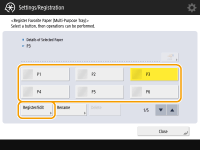
You can change the registered name by pressing <Rename>.
4
Select the paper size and press <Next>.
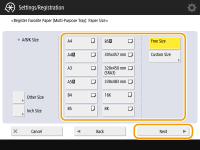
 When registering custom size paper
|
1
|
Press <Custom Size>.
|
|
2
|
Specify the length of the <X> (shorter) side and <Y> (longer) side.
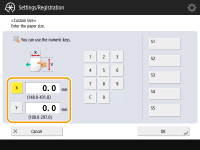 Press <X> or <Y> to enter the length of each side using the numeric keys.
NOTE:
If you register the paper size you use frequently on buttons <S1> to <S5>, you can call them up with one touch. Registering Free Size Paper (Custom Size Paper)
|
|
3
|
Press <OK>.
|
5
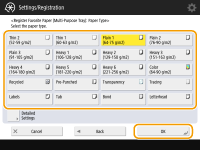
Select the paper type and press <OK>.
6
Press <Close>.
<Paper Settings> <Multi-Purpose Tray Defaults>
<Multi-Purpose Tray Defaults>